

Turn an accepted quote into an order
Build quotations from the product catalogue and generate a new sales order from the accepted offer without re-entering its customer, terms, or lines.
Explore QuotationsWholesale distribution solution
BusinessIntents connects B2B quotations, customer orders, supplier sourcing, purchasing, multi-store inventory, invoicing, and accounting for distributors that sell products in bulk.
Behind that workflow, the software stores products, customers, suppliers, opportunities, quotations, sales orders, requests for quotation, supplier quotes, purchase orders, stock movements, invoices, payments, and journal entries. Catalogue prices are used today; customer-specific price lists, volume-discount tiers, and wholesale credit limits are not currently modelled.
Start with the documented wholesale operating model, then adapt records, fields, approvals, reports, or modules when your distribution process differs.
Both sides of the trade
Sales can move an accepted catalogue-based quotation into a draft order, while purchasing records a request, compares supplier responses, and converts a selected quote into a draft purchase order. The warehouse and finance teams then continue through separate, linked operational documents.
Build quotations from the product catalogue and generate a new sales order from the accepted offer without re-entering its customer, terms, or lines.
Explore QuotationsRecord an RFQ, capture each supplier response, select the preferred quote, and generate a draft purchase order from it.
Explore RFQsReceipts, issues, transfers, returns, adjustments, and stocktakes write signed movements that determine on-hand by product and store.
Explore InventoryRole-aware wholesale workflow
Each team owns its operational step while customer, supplier, product, store, currency, and document references carry the transaction into the next decision.
Qualify the opportunity, prepare a quotation, and convert the accepted offer into a sales order.
Request supplier prices, compare responses, and turn the selected quote into a purchase order.
Receive, issue, transfer, return, correct, or count stock so the ledger matches the documents.
Handle sales and purchase invoices, customer and supplier payments, and the related accounting work.
Stock in practice
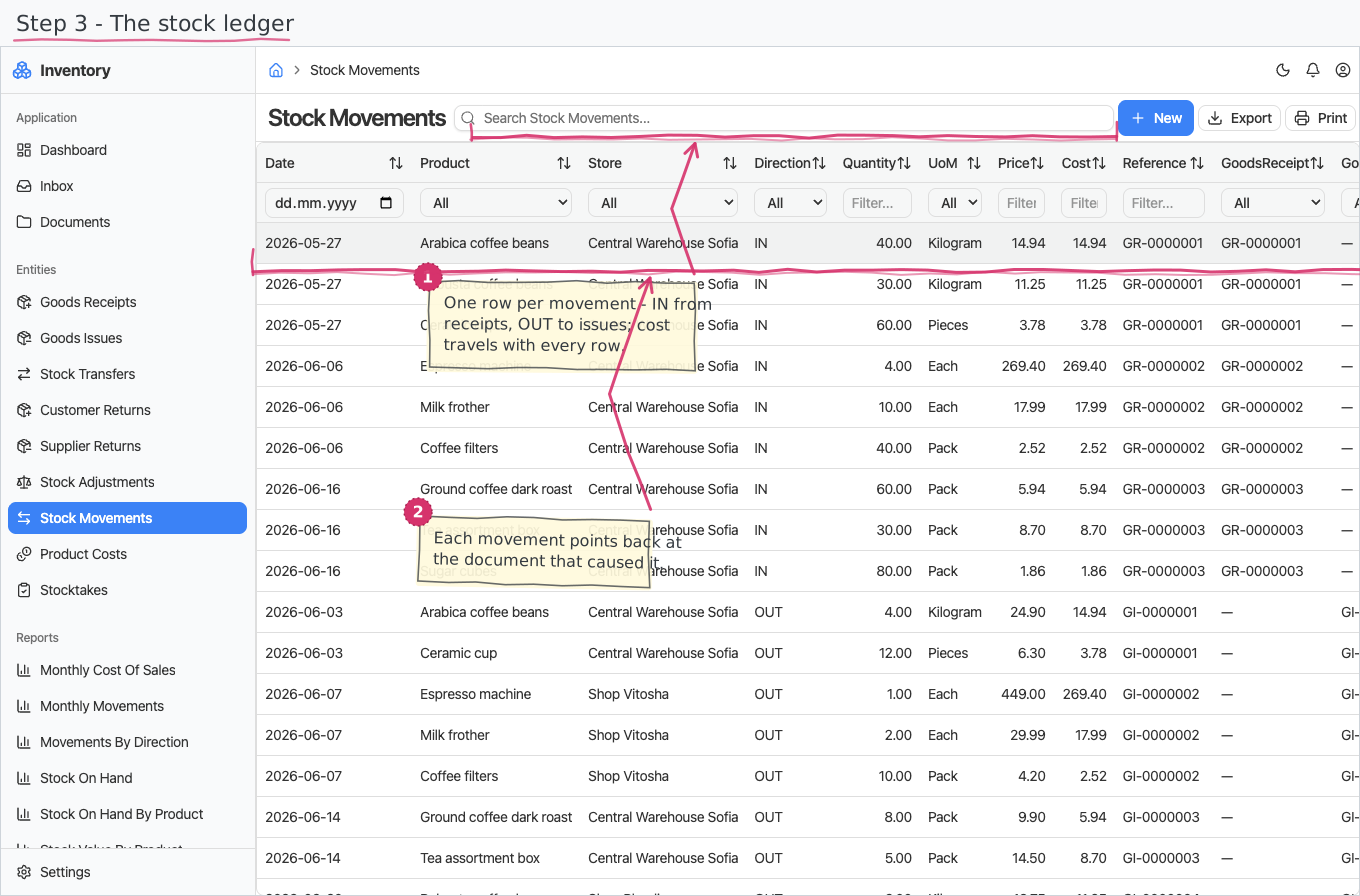
The stock ledger records each posted movement with its date, product, store, direction, signed quantity, unit, price, valuation cost, and source-document reference. On-hand is calculated from those movements rather than maintained as a separate number.
Commercial and technical clarity
The owner can follow demand, sourcing, stock, invoices, and payments. The people supporting the system can trace the modules, document links, statuses, and approval handoffs behind each result.
Opportunities, quotations, orders, invoices, customer payments, and open balances.
RFQs, supplier responses, selected quotes, purchase orders, and supplier bills.
Goods documents, signed movements, on-hand quantities, counts, and stock value.
Documented module boundaries, lifecycle states, flow guides, and shared master data.
The broader wholesale operation
The Wholesale solution combines customer-facing work, supplier-side purchasing, physical stock, billing, and accounting in the same suite.
Customer-specific wholesale price lists, volume-discount tiers, and wholesale credit-limit rules are not currently modelled; selling prices come from the product catalogue.
A starting point, not a fixed package
BusinessIntents can adapt documents, fields, approval paths, reports, or business areas on request when the ready-to-run Wholesale solution is close but not exact.
Try BusinessIntentsDecision-stage answers
It is designed for B2B distributors that sell products in bulk, source from suppliers, fulfil orders from one or more stores, and keep sales, purchasing, inventory, billing, payment, and accounting records together.
Sales prepares a line-item quotation using catalogue defaults. An accepted quotation can generate a new draft sales order with the customer, terms, and lines copied across.
A buyer records an RFQ, enters each supplier response, compares the quotes, and selects the preferred response. That quote can generate a draft purchase order with its supplier, currency, prices, quantities, and terms.
Yes. Receipts and issues affect a specific store, while a transfer posts an outgoing movement from the source and an incoming movement to the destination.
No. Prices currently come from the product catalogue; customer-specific price lists, volume discounts, and wholesale credit-limit rules are not modelled.
Yes. Documents, fields, approval paths, reports, and whole business areas can be adapted on request.
Follow both sides of one trade
Use a real wholesale transaction to review where the documented flow fits and where your operation needs a different record or decision.