

Handle inbound and outbound orders
Use purchase orders for incoming supply and sales orders for customer demand, with the receiving or fulfilling store on the commercial document.
Explore Sales OrdersLogistics operations solution
BusinessIntents connects inbound and outbound orders, warehouse stock, delivery documents, customer and supplier records, service tickets, invoicing, and accounting for operators that move and store goods.
Behind that workflow, the software stores warehouses, products, orders, goods receipts and issues, transfers, returns, stock adjustments, delivery notes, invoices, payments, and support tickets. It does not currently model shipments, carriers, freight rating, fleet operations, or route planning.
Use the documented warehouse and service workflows as a starting point, then adapt records, approvals, reports, or modules where your operation differs.
Movement-level traceability
Receipts, issues, transfers, returns, and corrections post signed movements. Each posted line records the date, product, store, direction, quantity, cost, and the document that caused it, while on-hand is calculated from the ledger rather than maintained separately.
Use purchase orders for incoming supply and sales orders for customer demand, with the receiving or fulfilling store on the commercial document.
Explore Sales OrdersReceive, issue, transfer, return, adjust, or count goods so the signed movement ledger remains the source for stock on hand by product and warehouse.
Explore InventoryLog a requester, priority, category, assignee, and conversation; triage the case, request information when needed, and close it with a reusable solution.
See the ticket flowWarehouse handoffs
The order, inventory document, movement line, and delivery note stay separate because they answer different operational questions, but their references keep the trail connected.
Capture the customer or supplier, products, quantities, dates, and store.
Confirm what physically arrived or left before the ledger changes.
Copy the posted issue into a quantity-only customer document.
Issue invoices, record payments, and work service tickets around the transaction.
Dispatch in practice
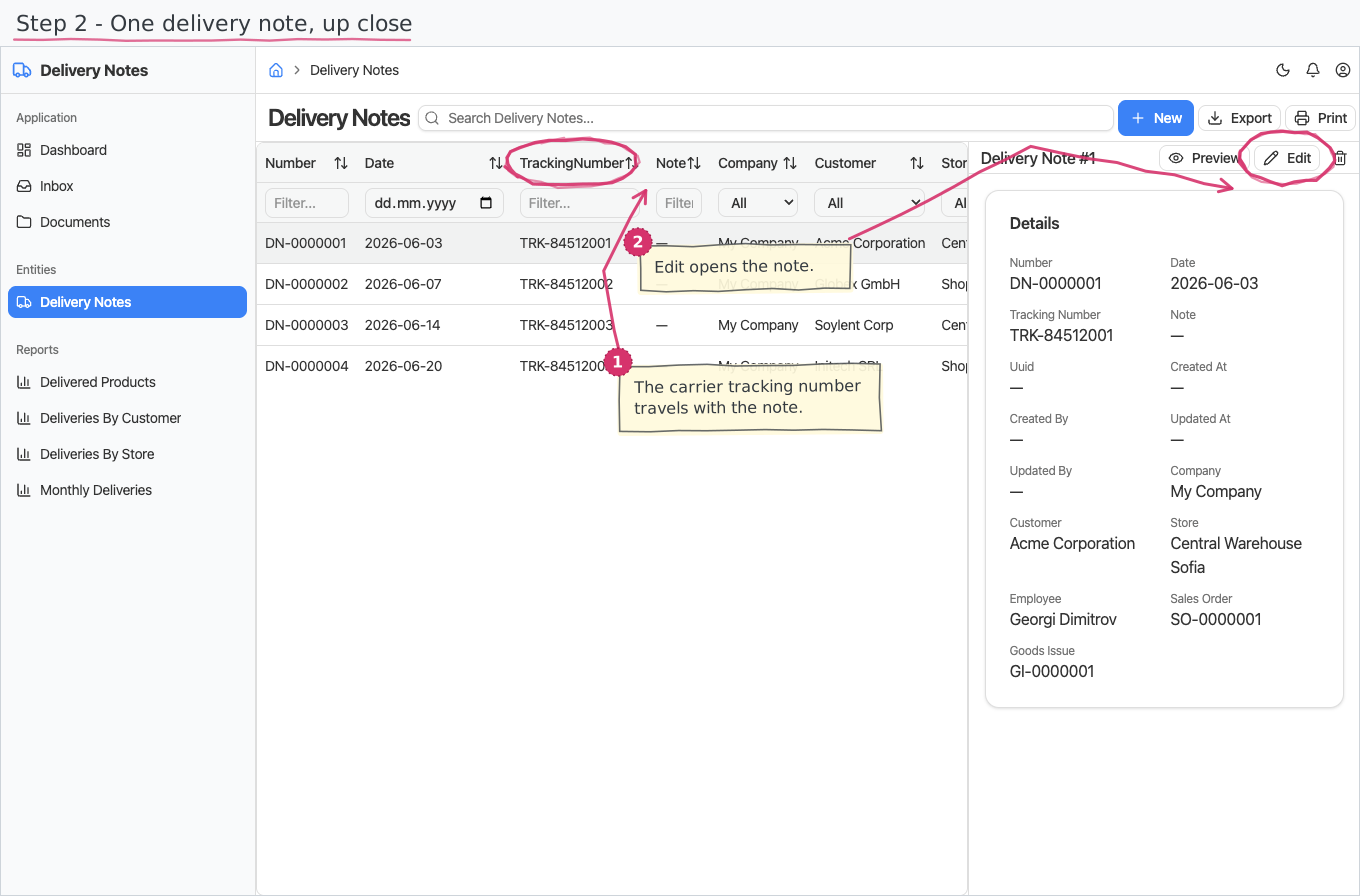
A delivery note records the customer, dispatching store, date, optional employee, sales order, goods issue, tracking number, and quantity lines. The normal path creates it from a posted goods issue so the dispatch data does not need to be typed twice.
Two operational views
Warehouse records answer what moved and why. Service tickets hold the conversation when a customer, supplier, or employee needs an answer.
Orders, receipts, issues, transfers, returns, counts, and on-hand reports by store.
Ticket priority, assignee, conversation, status, escalation flag, and recorded solution.
Movement, stock value, order, invoice, payment, and ticket reports.
Linked module and flow documentation for the people maintaining the setup.
The wider logistics back office
The Logistics solution combines warehouse movement records with the customer, supplier, people, billing, and accounting work around them.
Shipments, carrier management, freight rating, fleet records, and route planning are not currently modelled. Delivery notes are the only transport-shaped document in the documented solution.
A configurable starting point
BusinessIntents can adapt documents, fields, approvals, reports, or business areas on request when the standard Logistics solution does not match your operating model.
Try BusinessIntentsDecision-stage answers
It is designed for operators that manage warehouses and stock movements, handle inbound and outbound orders, create delivery notes, work service tickets, and keep invoicing and accounting records around those operations.
On-hand is the live sum of signed movement quantities per product and store. The ledger records the source document behind each posted receipt, issue, transfer, return, or adjustment.
Yes. The delivery note can copy the customer, store, sales order, and quantity lines from a posted goods issue while retaining a link to it.
Yes. Tickets support triage, assignment, requester conversations, internal notes, information requests, escalation flags, resolution, and a reusable solution record.
No. Shipments, carriers, freight rating, fleet operations, and route planning are outside the currently documented solution.
Yes. Documents, fields, approval paths, reports, and complete areas can be adapted on request.
Follow one dispatch
Use a real outbound process to review where the documented workflow fits and where your operation needs a different record or handoff.