

Set up the engagement
Create the project, connect its customer, add tasks, assign employees, and store the billing rate for each person on that engagement.
Explore ProjectsProfessional Services Solution
BusinessIntents connects project setup, day-by-day time capture, manager approval, and invoicing for consultancies, agencies, and other firms that sell their expertise.
Behind that workflow, the software stores client projects, tasks, team assignments, and project-specific billing rates. From those records, it prepares monthly employee timesheets, routes them for submission and manager approval, and can create a draft sales invoice once a project month is approved.
Start with the operating flow already in place, then adapt documents, fields, approvals, reports, or modules when your firm works differently.
One connected record chain
Separate project, time, and invoicing tools leave somebody reconciling names, rates, and totals at month end. Here, the customer belongs to the project, each team member has a project-specific billing rate, booked days roll into employee and project-month totals, and an approved month can generate the draft invoice. The commercial trail stays visible from the first assignment to the invoice waiting for review.
Create the project, connect its customer, add tasks, assign employees, and store the billing rate for each person on that engagement.
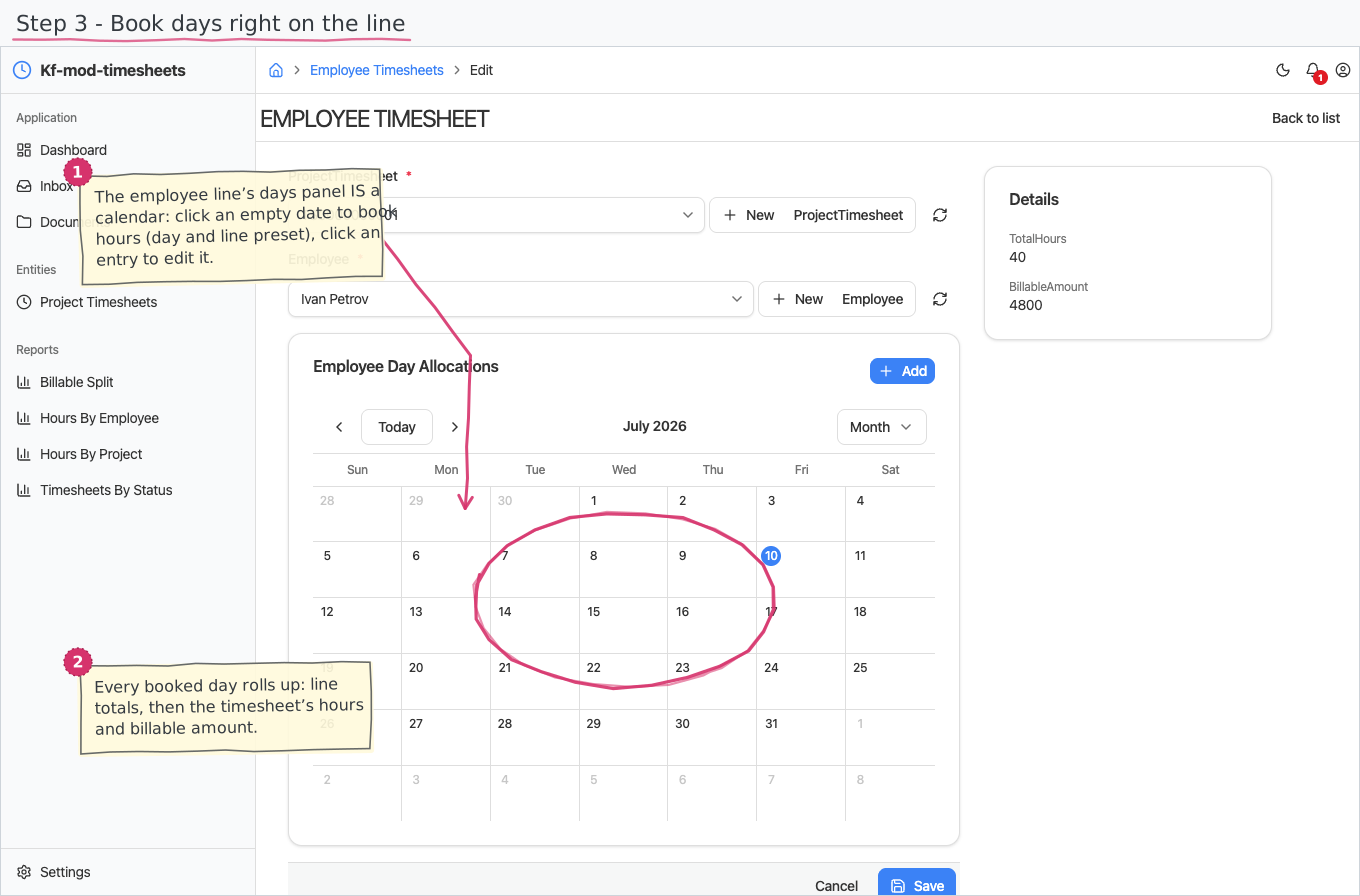
Explore ProjectsEmployees review and adjust their days on a monthly calendar, with billable and non-billable hours allocated to the relevant project task.
Explore TimesheetsAfter approval, the project month can create a draft sales invoice with one line per employee, ready for normal review, issue, and sending.
Explore Sales InvoicesFrom assignment to invoice
The workflow separates employee input, manager approval, and back-office billing while the same records carry the month forward.
Set the customer, tasks, team, dates, and project-specific billing rates.
Adjust the pre-filled month, allocate work to tasks, and submit the timesheet.
Approve or reject from the Inbox with total hours and billable amount in view.
Generate the draft, check its employee lines, then continue through the sales-invoice flow.
A practical employee surface
Each employee works from their own monthly timesheet. They can correct hours, choose project tasks, and mark non-billable time without seeing internal rates or billable amounts; managers retain the commercial view needed for approval and billing.
Different views, shared records
Business owners can follow work, approvals, and billing without asking for another reconciliation file. Technical and administrative teams get explicit statuses, linked records, shared registries, and documented workflows instead of an invisible automation chain.
Review project status, submitted hours, billable totals, approval progress, and the invoices created from delivered work.
Work in the Personal space, see only your own timesheets, and keep billing rates outside the employee view.
Use Inbox tasks to approve, reject, and return corrections through the same status-controlled process.
Trace customers, projects, assignments, timesheets, status changes, and generated invoices through documented records.
More than project time
The Professional Services solution combines the operational areas needed before, during, and after client delivery.
A starting point, not a fixed package
A document, field, approval path, report, or module can be adjusted when the ready-to-run solution is close but does not match the way your business works.
Try the starting solutionDecision details
It is designed for consultancies, agencies, and other professional services firms that plan client projects, record project time, approve timesheets, and invoice customers for delivered work.
Yes. On the first of each month, active projects receive a prepared project month with an employee line for each assignment and working-day allocations ready for review.
No. An approved project month can generate a draft sales invoice after confirmation. The draft remains editable and then follows the normal approval, issue, and sending process.
No. The Personal timesheet surface withholds billing rates, day amounts, and rolled-up billable totals. Managers see the commercial totals in the back-office workflow.
Yes. The shared “Enter data as…” function lets an administrator work in a selected employee's Personal view while the audit trail retains the administrator's identity.
Yes. The documented customization options include documents, fields, approval paths, reports, and modules.
Start with a real client month
Use a familiar engagement to check the ready-to-run workflow, the information each role sees, and the places your firm may want to adapt.