

Payroll
Keep each employee's salary with its full history, record the month's bonuses, overtime and deductions as they happen, and run payroll each month — one click computes a payslip per employee: pay for the days actually worked, the seniority bonus, contributions, income tax and net (split bank/cash), from configurable per-year schemes and the approved leave calendar.
Where you find it: the People (HR) sidebar group (nomenclatures on the Settings page). Bundled in Construction, Logistics, Professional Services and Retail; shown by the Payroll lens.
The tour in pictures
What you can do
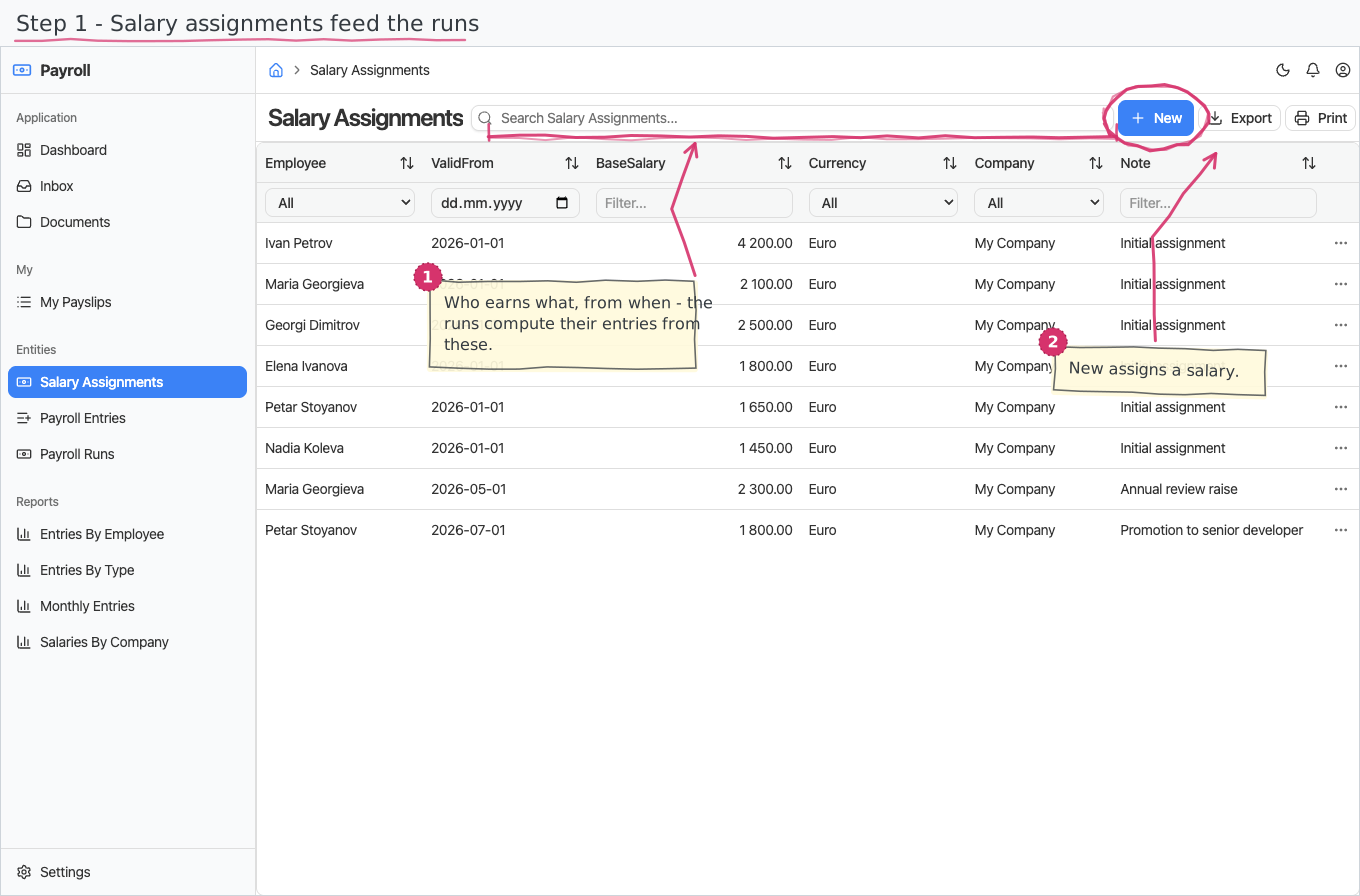
Salary Assignments
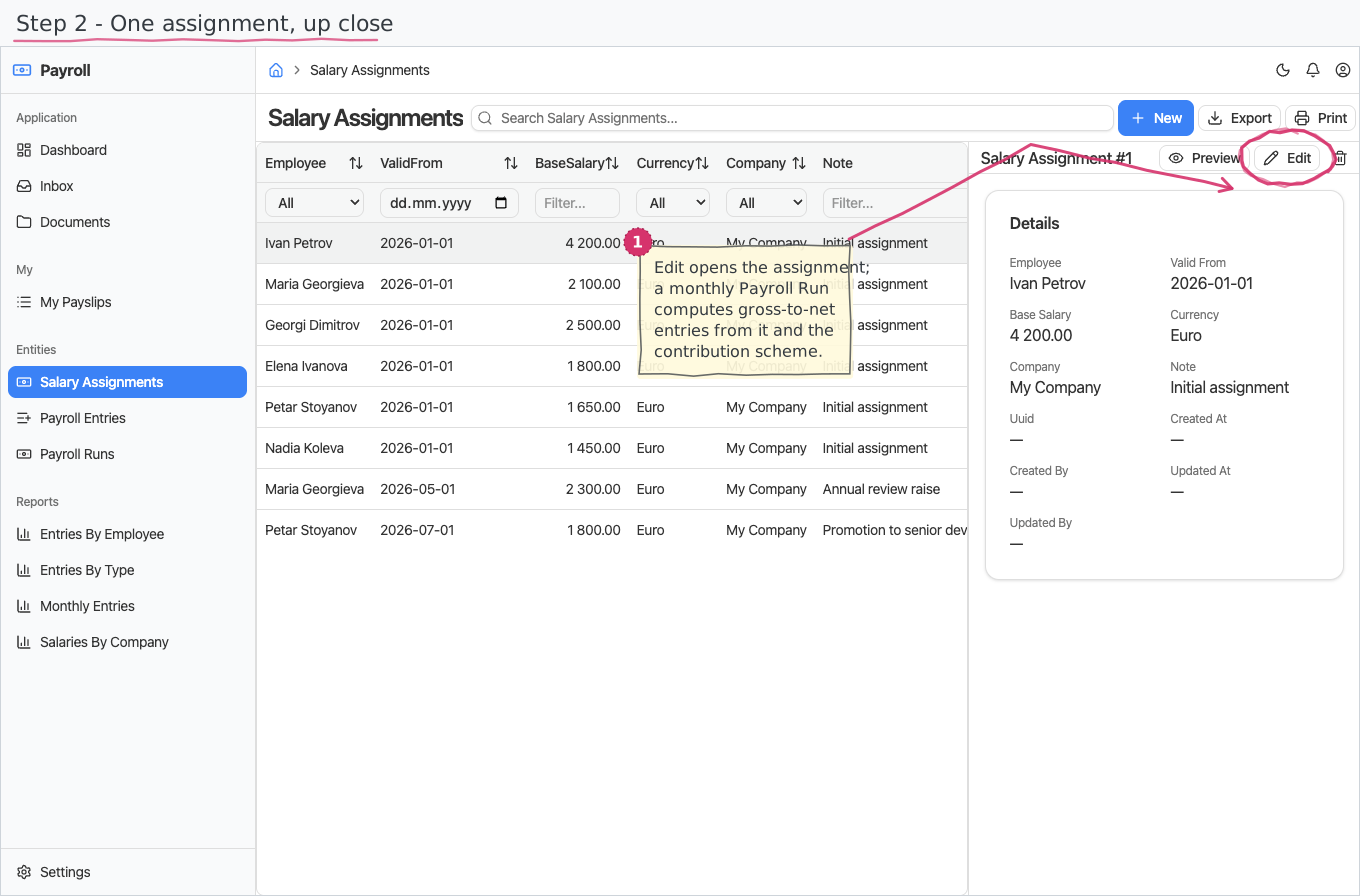
One row per salary, per employee — the register of who earns what and since when:
- Pick the Employee (required), the date the salary is valid from (required) and the monthly base salary (required). The Company and Currency (EUR) start pre-filled.
- A raise or salary change is a new row with a later valid-from date — you never edit the old one. The current salary is simply the employee's newest row; the table itself is the full, auditable salary history. There is no "valid until" to maintain: the next row supersedes.
- A free-text note holds the context (annual review, promotion…).
Payroll Entries
The month's one-off amounts, each its own record — a different bonus every month means a new entry every month, and the salary assignment stays untouched:
- Pick the Employee (required), the month it belongs to (enter the first of the month), the type and the amount (always positive — the type decides whether it adds or subtracts), plus a reason ("Q2 target bonus").
- The type carries the semantics: Bonus, Overtime and Allowance add to pay; Deduction and Advance subtract. Whether an amount is taxable is also a property of its type.
- The monthly payroll run sweeps the month's entries into each employee's payslip automatically; an entry shows which payslip took it. Until swept, the register is the "this month, not yet paid" view.
Payroll Runs
- Create a run for a month (enter the first of the month) — it is numbered automatically (PAY…) and the payslips are computed immediately: one per employee with a salary effective that month. Each payslip shows:
- Pay for worked days — the base salary prorated by the days actually worked: the month's working days (weekends and public holidays excluded) minus the employee's approved sick, unpaid and parental leave from the Vacations calendar. Paid annual leave does not reduce pay. Worked, sick and unpaid day counts appear on the payslip.
- The seniority bonus (клас прослужено време) — computed automatically from the employee's hire date plus any prior experience on their record: full years of professional experience times the scheme's per-year percent (0.6% in the shipped 2026 scheme). The payslip shows the percent and the experience (years/months/days).
- Employer sick pay — for a sick leave that starts in the month, the employer-paid first days at the configured percent of the daily base (Bulgaria 2026: the first 3 working days at 70% — both numbers live on the contribution scheme, see Settings; the rest is paid by НОИ directly, so it never appears here). Maternity/parental leave is fully НОИ-paid — file it as Parental leave, not sick.
- The swept additions and deductions, the insurable income (earnings clamped to the year's minimum/maximum, both prorated by worked days), the employee contributions (and their total percent), the income tax, the gross, the total deductions, the net — split into to bank (when the employee has an IBAN on file) and in cash — and the employer cost, with fiche lines spelling out every amount in two groups: earnings (base, seniority, sick pay, entries) and deductions (entry deductions, each contribution fund, the tax).
- Review — the run's totals (gross, deductions, contributions, income tax, net, employer cost) sum automatically; a Post task waits in the Inbox.
- Post makes the run final. Reject cancels it: the payslips are removed and the swept entries are released, so they sweep again into the next run — that is also how you recalculate (fix the entries or assignments, reject, create a new run).
- A run with no payslips cannot be posted (you'll get a message — usually it means no salary assignments were effective for that month), and a run for a year without a contribution scheme fails calculation with a message naming the year.
Payslips reach the employees by themselves
The moment a run is posted, every employee in it is e-mailed their own payslip as a PDF — one message per payslip, addressed to the e-mail on the employee's record, naming the month and the net pay. Nobody has to export or forward anything, and no employee ever receives anyone else's.
- A payslip is now a document in its own right: open one and you see its header and its fiche lines, and you can Print it (or save the PDF) exactly like an invoice. That is the same document the e-mail attaches.
- An employee with no e-mail address on file is skipped — the run stays posted, and the skip is recorded in the log so payroll can fill the address in. The same is true if the mail server rejects a message: the remaining payslips still go out.
- Re-posting is not how you re-send. Posting mails each payslip once; if a message needs to go again, send the PDF from the payslip itself.
- Sending needs the instance's outgoing-mail configuration (like every other e-mail in the suite).
My Payslips — the employee's own surface
My Payslips on the Personal shell is a read-only view of an employee's own payslips: they see their base salary, additions, deductions, insurable income, contributions, income tax, gross, net and employer cost, with the full fiche lines — but only for themselves, and they can never create, edit or delete a payslip (there is no New button; payslips are produced only by posting a payroll run). Nobody sees another employee's pay on this surface. Payslip figures are intentionally not hidden here — an employee is meant to see their own numbers; the personal scope, not field hiding, is what keeps other people's pay private.
Statutory declarations (Д1 / Д6)
For any payroll run, download the two monthly filings' data as spreadsheet-ready files (Cyrillic opens correctly in Excel): Д1 — one row per insured person with ЕГН, names, days in insurance, insurable income, every fund's employee/employer amounts and the income tax; Д6 — the employer's totals per fund plus the tax and the grand total due. The numbers always match the payslips to the cent. These are the accountant-ready data sets — the exact NAP file format is a verification step your accountant performs against the official Наредба Н-13 layouts. Employees need their ЕГН filled in (on the employee record) for Д1 to be complete — an employee without one still appears, with an empty ЕГН cell.
The two files are downloads on the run's id (1 below is the payroll run):
- Д1:
/services/java/payroll/custom/payroll/DeclarationsController/1/d1.csv - Д6:
/services/java/payroll/custom/payroll/DeclarationsController/1/d6.csv
An unknown run id answers 404. Days in insurance counts the employee's worked days plus sick/parental days (they remain осигурителен стаж); working days respect the public-holiday calendar shipped with Vacations. Unpaid leave days are not counted. Fund names print as they are entered in the contribution scheme (English in the shipped seed).
Printing
The payroll run and its payslips print to a branded standard layout. Open the document and use Print to view it or save it as PDF; the template lives under Documents and can be customised per company. See how printing works for the shared mechanics. The payroll run now prints in Bulgarian too — the run's printout is the ведомост the accountant expects, and wherever a document has both languages the Print button asks which one you want. The payslip ships in English and Bulgarian as the classic two-column фиш: the employee header (name, national ID, position, experience, worked days, contribution percent), earnings on the left, deductions on the right, and the net with its bank/cash split at the bottom. (On platform builds that predate the two-column print feature, the same figures print in single tables.)
Reports & dashboard
- Entries By Type — how much of the month's extras are bonuses vs deductions.
- Entries By Employee — entry totals per person; also a dashboard top-5 list widget.
- Monthly Entries — entry count and amount per month as a bar chart.
- Salaries By Company — assignment count and base-salary sum per company.
Settings
- Payroll Entry Types — Bonus, Overtime, Allowance, Deduction, Advance pre-seeded; each carries its direction (adds/subtracts) and whether it is taxable. Add your own types freely — they are data, not code.
- Contribution Schemes and Contribution Rates — the statutory numbers per year: the minimum and maximum insurable income, the flat income-tax percentage, the seniority percent per year (0.6 shipped — clear it to switch the seniority bonus off), the employer sick-pay percent and days (70% / 3 days shipped — clear either to switch employer sick pay off; set them to whatever your jurisdiction mandates), and each contribution (pensions, sickness & maternity, unemployment, supplementary pension, health, work accident) with its employee/employer split. A new year is a new scheme row. The shipped 2026 values are a starting point — verify them against the year's budget acts before your first live payroll. (Tenants created before 2026-07-31: the two sick-pay fields arrive empty on the existing 2026 scheme — set them once here.)
Shipped data
Entry types and the 2026 contribution scheme are pre-seeded (with Bulgarian translations); a new company starts with no assignments or entries. The optional demo companion (demo-data) adds salary assignments for the six demo employees — including two mid-year raises that showcase the salary-history pattern — and three months of bonuses, overtime, allowances, an advance and a deduction for trials.
Works together with
- Employees — every assignment, entry and payslip names an employee; the hire date, prior experience and IBAN on the employee record feed the seniority bonus and the bank/cash split; Companies — whose payroll it is; Currencies — EUR-based salaries; Document numbering — the "Payroll Run" series.
- The accounting vertical (planned) — a posted payroll run will post salaries, contributions and tax to the ledger automatically.
- Vacations — approved sick, unpaid and parental leave prorates pay automatically, and the public-holiday calendar defines the month's working days. Payroll needs the Vacations module in the same app for this (every bundled app already has it); with no leave recorded, a month is simply paid in full.