

Vacations
Request and approve employee leave on a shared calendar. Each employee has a per-year account of vacation days; a request goes through an approval flow and, once approved, draws its days down from the oldest year that still has balance.
Where you find it: the People sidebar group — Vacation Requests (the booking calendar) and Vacation Entitlements are both sidebar entries there (the status nomenclatures are on the Settings page; their names are translated to Bulgarian). Bundled in Construction, Logistics, Professional Services and Retail; shown by the Vacations lens.
The tour in pictures
What you can do
Vacation Entitlements
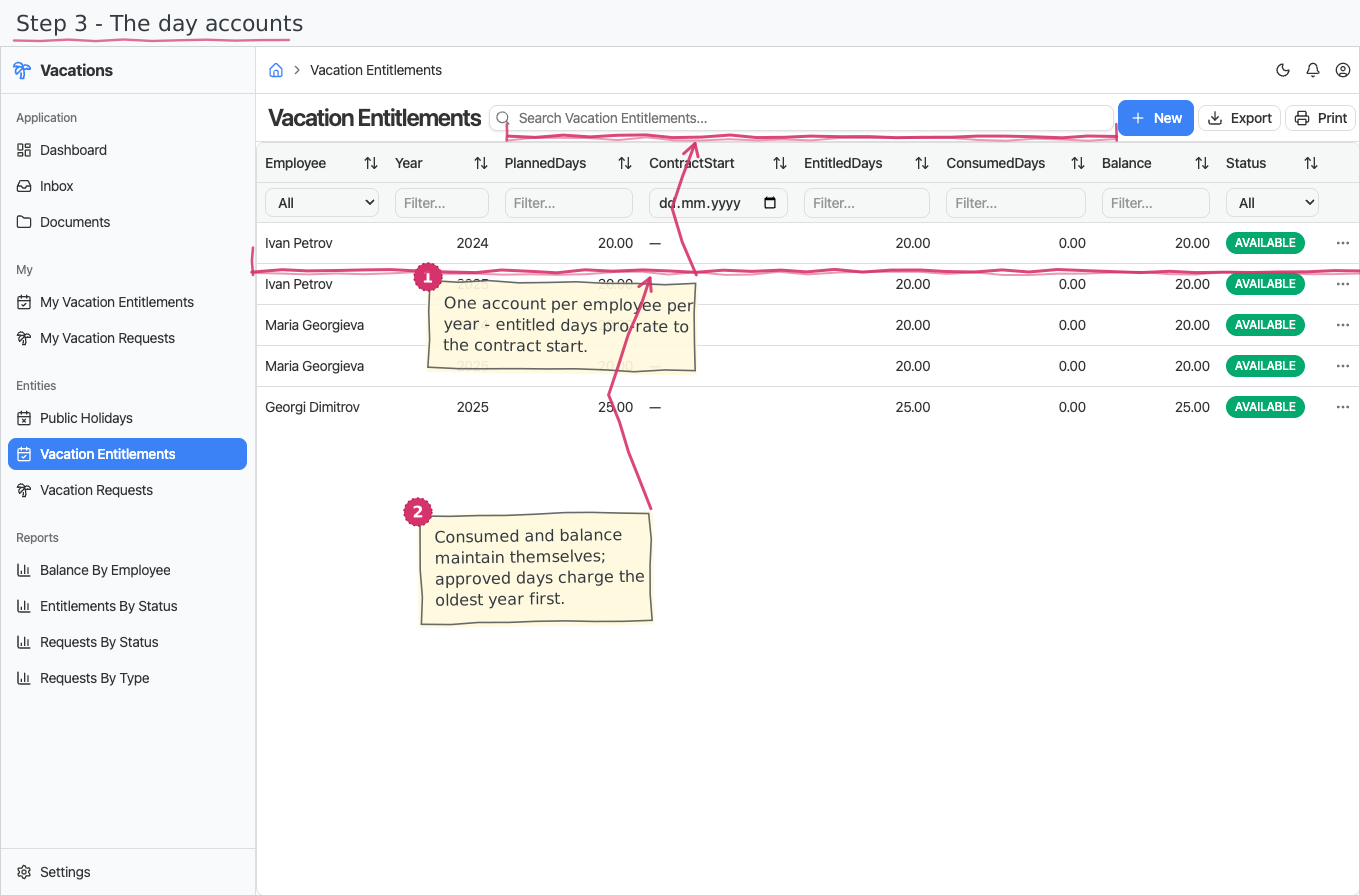
The per-year day account — "Ivan — 2024 — 20 days". One record per employee per year:
- You pick the Employee, enter the year and the planned days (the full-year allowance, e.g. 20), and — for people who joined mid-year — a contract start date.
- Entitled days (the account's real capacity) calculates itself: the planned days pro-rated to the part of the year actually worked, rounded to whole days. Leave the contract start empty for a full year.
- Consumed days and balance are read-only and maintained automatically as approved requests charge days against the account.
- The status badge follows the balance on its own: AVAILABLE (nothing used yet) → PARTIAL (some days used) → EXHAUSTED (all used up).
- Carry-over expiry: an unused entitlement year lapses after the carry-over window — by default two years after the year it was earned (Settings → Vacation Policy). A lapsed year is no longer counted toward capacity and can never be drawn (BG practice: paid leave expires two years on).
- Monthly accrual (optional): turn on accrual monthly in the Vacation Policy and the current year's days accrue month by month (this month counts) instead of being granted up front — so in, say, April an employee can take at most 4/12 of the year's allowance. The annual figure and the balance column still show the full-year grant; the limit is applied when a request is submitted and approved. Off by default (whole year available from January 1).
Vacation Requests — the leave calendar
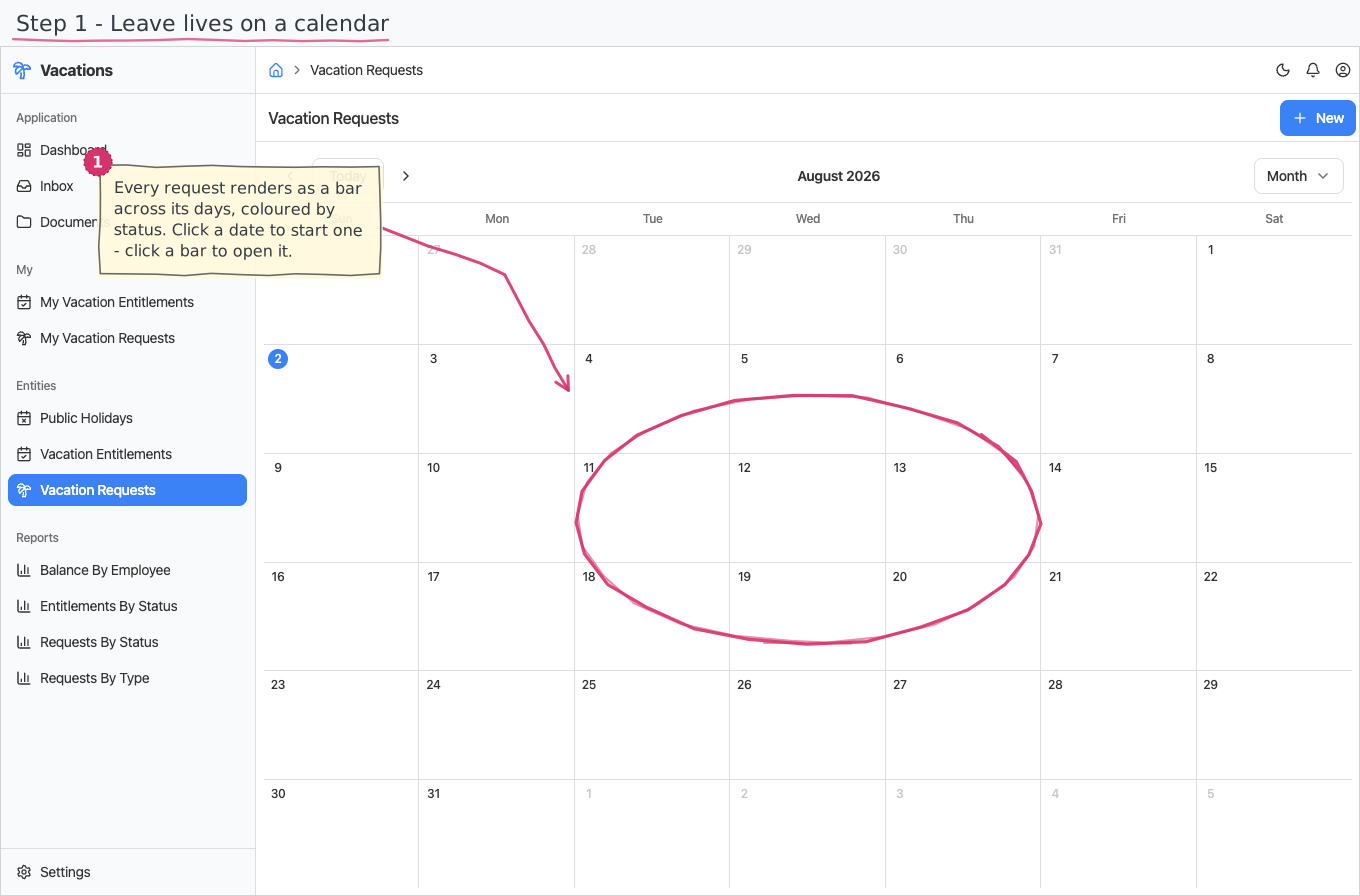
Requests open as a calendar, not a list: every leave span renders as an all-day bar across its from–to dates, coloured by status and titled with the employee's name (switchable month view).
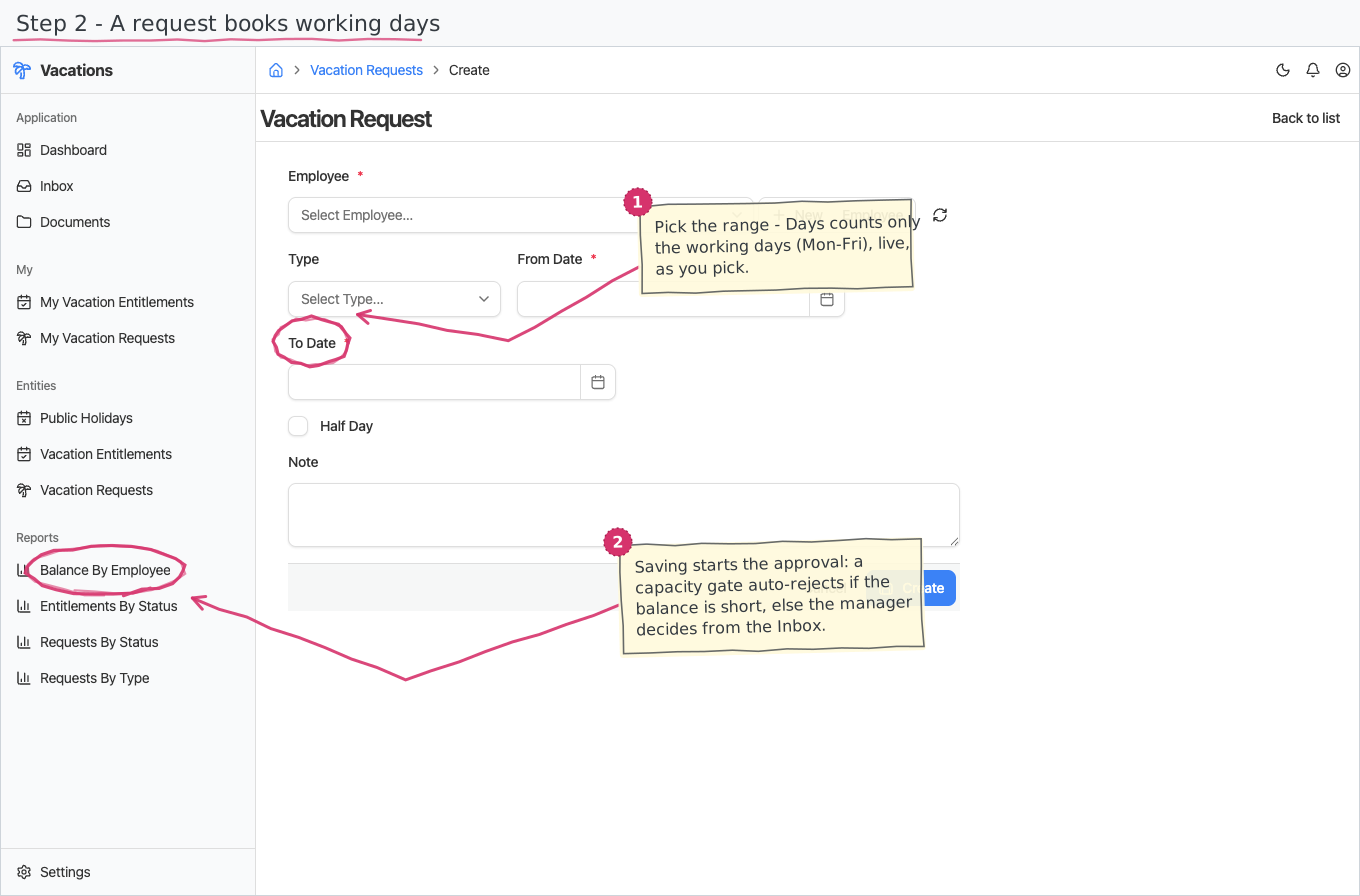
- Click a date to create a request — the from-date comes prefilled; pick the employee and the to-date, choose the leave type (Paid annual leave by default; Sick, Unpaid, Parental), optionally add a note.
- Click an existing bar to open that request for viewing/editing.
- Days is read-only and computed server-side: the working days in the from-to span with weekends and official public holidays excluded (the holiday list is maintained under Public Holidays).
- Half day — tick it on a single-day request to take half a day (Days becomes 0.5, and the approval books a single 0.5 day); it has no effect on a multi-day span, or on a day that is a weekend/holiday (0).
- Number — a VAC-number is stamped automatically the moment the request is created, from the shared "Vacation Request" numbering series; it is the request's title.
Because the calendar takes the place of the request's document page, approvals are done from the Inbox (see the flow below), and the individual day records are created for you — you never edit them by hand.
My Vacation Requests — the employee's own surface
Requests are personal: on the My Vacation Requests page (in the Personal shell) an employee sees and books only their own leave — rendered as the same range calendar the back office gets, with your requests as events. Click an empty day to book leave starting there (the date is prefilled); click an event to open the request. The employee on a new request is always you, whatever the form is told. The shared calendar and corrections for others stay on the regular pages for the back office.
My Vacation Entitlements sits next to it on the Personal shell as a read-only balance view: an employee sees their own year-accounts (entitled, consumed and remaining days, with the status badge) but cannot create or edit them — entitlements are still granted and adjusted only by HR on the back-office pages. There is no New button and the page never exposes anyone else's balance.
The approval flow (who does what)
Every new request starts the approval process; tasks land in the assignees' Inbox:
- Submit — the employee reviews the request (number, dates, days, note) and submits it; the status moves to SUBMITTED.
- Capacity gate — before any manager sees it, the system checks the employee's remaining balance. Only Paid annual leave consumes entitlement — sick, unpaid and parental leave pass the gate unconditionally and charge nothing. For a consuming request the balance is summed across the entitlement years still within the carry-over window (see below); if the requested days exceed what is left, the request is auto-rejected as INSUFFICIENT — no task is created.
- Approve — anyone in the Manager group approves or rejects. Reject sets REJECTED; approve sets APPROVED and, for a consuming request, creates the day records on the actual working dates, charging them oldest entitlement year first — a day taken in 2026 may still draw on the 2024 account if that year has balance left. The entitlements' consumed/balance figures and status badges update on their own.
Vacation Days
The individual day-off records behind an approved request (one row per working day, normally 1 day each). They are created by the approval step and link each day to the request it belongs to and the entitlement year it is charged against — the calendar date and the charged year are independent.
Printing
Vacation requests print to a branded standard layout. Open the document and use Print to view it or save it as PDF; the template lives under Documents and can be customised per company. See how printing works for the shared mechanics. Requests print in Bulgarian or English — the Print button asks which language you want.
Reports & dashboard
Which requests count. Requests and days per leave type covers requests that are real - submitted and approved. Drafts, rejected requests and those stopped by the balance check never became leave, so their days are not counted. Remaining balance per employee shows all entitlement accounts including exhausted ones - an exhausted account still holds a real entitled/consumed figure.
- Balance by Employee — entitled, consumed and remaining days per employee.
- Entitlements by Status — how many year-accounts are available/partial/exhausted, and the days left in them.
- Requests by Type — requests and total days per leave type (paid / sick / unpaid / parental).
- Requests by Status — the request pipeline: count and total days per status; also a dashboard counter widget ("Vacation Requests").
Settings
- Vacation Statuses — the request statuses (DRAFT, SUBMITTED, APPROVED, REJECTED, INSUFFICIENT pre-seeded).
- Entitlement Statuses — the account statuses (AVAILABLE, PARTIAL, EXHAUSTED pre-seeded).
- Leave Types — Paid annual leave (consumes entitlement), Sick, Unpaid, Parental (do not); the "consumes entitlement" flag is what the capacity gate reads.
- Public Holidays — the official non-working days, excluded from every request's day count; ships BG 2026 (including observed/shifted days) — add each following year's rows.
- Vacation Policy — the carry-over window in years (default 2) and the accrual monthly toggle (off = whole year up front).
Shipped data
Both status nomenclatures are pre-seeded (above); a new company starts with no entitlements and no requests. The optional demo-data companion adds five demo entitlements (2024/2025) for the demo employees, untouched — full balance — so trials can walk the request → approve → consume journey.
Works together with
- Employees — the requester and the account owner; the employee's manager gets the approval task.
- Document numbering (built into the platform) — the "Vacation Request" VAC-number series.