Skip to content

Sales invoicing feature

Keep every invoice moving from draft to paid.

BusinessIntents gives billing, approval, issuing, sending, payment allocation, and correction one connected document trail.

Create invoices from products or free-text lines, apply customer payment terms, issue sequential numbers, store printable copies, and follow the balance as matching payments arrive. Approval tasks and a credit-limit check put deliberate decisions before the invoice is issued.

Use the ready-made workflow as a starting point, then adapt fields, approvals, reports, or connected business areas when your billing process differs.


ApprovalNumberingPaymentsRemindersCorrections

One controlled receivables flow

Move the document forward without losing the record behind it.

A sales invoice begins as an editable draft and becomes locked when it is issued. The number, printable copy, status, paid amount, and open balance then stay with the document, so billing work does not disappear into separate files and follow-up lists.

01

Build the invoice with reliable defaults

Select the customer and date, then add product-based or free-text lines. Company, currency, payment method, due date, price, unit, and tax defaults reduce re-entry while remaining editable where the workflow allows it.

Explore Sales Invoices
02

Put approval before issue

Approvers review the customer, dates, and total before an issuer assigns the real sequential number. If the customer's open balance would cross its credit limit, a human Proceed or Cancel task holds the decision in the light.

Review the approval flow
03

Let matching payments update the balance

Customer payments allocate to open invoices oldest first when customer and currency match. Paid, balance, and status update from those allocations, while manual allocation remains available for exceptions.

Explore Customer Payments

Role-aware invoice workflow

Give each decision to the right person.

Tasks appear in the responsible group's Inbox and on the invoice itself. The document advances only when the current action is completed.

  1. 1
    Billing clerk

    Prepare

    Add the customer, dates, terms, and lines, then check the calculated totals.

  2. 2
    Approver

    Decide

    Approve or reject the document and handle a credit hold when the limit is exceeded.

  3. 3
    Issuer

    Issue

    Stamp the sequential number and create the stored printable copy.

  4. 4
    Billing & finance

    Collect

    Send, confirm, follow overdue balances, and let payments move the invoice toward paid.

In the product

See the document, totals, status, and attachments together.

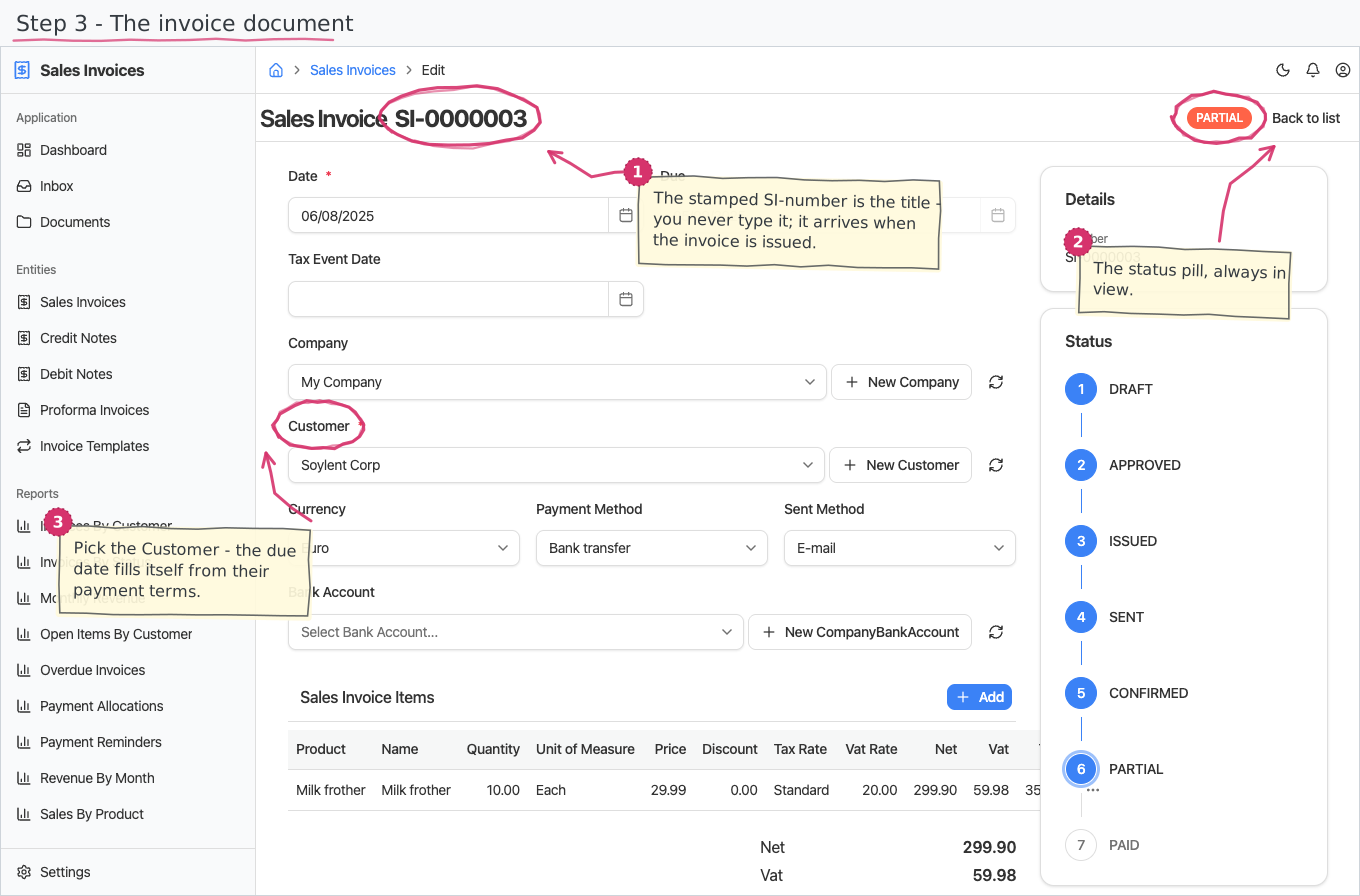
The invoice view keeps the commercial document beside its operational state. Users can review the customer and dates, inspect calculated totals, download stored PDF versions, and see how much remains open without rebuilding the story from several tools.

  • Draft-to-paid status trail
  • Sequential number at issue
  • Read-only calculated totals
  • Stored PDF versions
  • Partial-payment visibility
  • English and Bulgarian print layouts
Read the complete module guide
BusinessIntents sales invoice document showing customer details, status, totals, and actions
The invoice document keeps its lifecycle and financial position visible around the issued record.
Current scope

Automatic invoice and reminder e-mails require outgoing-mail configuration. Per-level automatic reminder wording is planned, and issued credit notes currently stand as separate correction documents rather than automatically settling the original invoice balance.

A starting point, not a rigid template

Adapt invoicing around your controls and customer terms.

BusinessIntents can tailor fields, documents, approval paths, reports, and connected areas when the standard invoice lifecycle is close to your process but not exact.

Try BusinessIntents

Decision-stage answers

Sales invoicing FAQs

When does an invoice receive its real number?

The sequential sales-invoice number is assigned when the issuer completes the Issue task. Drafts and approved but unissued invoices do not consume a number.

Can invoices require approval?

Yes. A new invoice moves through group-based approval and issuing tasks, with a credit-hold decision when the customer's configured limit would be exceeded.

How are customer payments matched?

Payments allocate automatically to that customer's open invoices, oldest first, when the customer and currency match. Manual allocation is available when the normal sequence does not fit.

Can BusinessIntents create recurring invoices?

Yes. Active invoice templates can create draft invoices monthly, quarterly, or yearly, after which the normal approval flow begins.

How is an issued invoice corrected?

An issued invoice is locked. Use a credit note, debit note, or, while nothing is paid, the void action so the original number and audit trail remain intact.

Does it send reminders for overdue invoices?

The documented workflow includes a weekly reminder e-mail and a manual reminder history. Outgoing mail must be configured, and different automatic wording for each escalation level is not currently available.

Follow one invoice end to end

Review the controls before you change your billing process.

Use a real invoice scenario to see where the documented workflow fits, where responsibilities should change, and which reports your team needs.

The BusinessIntents Business Suite - end-user guide.